Navigation

Learn in depth of all about the Galaxy S3 camera through my guide below.

The articles are based on my personal opinion and may subject to errors and mistakes. Do correct me if you found any misleading information.

I have stop updating this blog as this phone may retire from now on with new phones like Note 2 and S4 out in the market. The basics should work just fine and do enjoy the extra features that your new phone brought you.


Disclaimer: This is not a professional review and all the findings and opinions are based on my own experience only.


Part 1: Hardware and Features

Part 2: User Interface

Part 3: Limitations

Part 4: Shooting Mode

Part 5: Scene Mode

Part 6: Summary and Conclusion


CLICK ON THE LINK ABOVE TO START LEARNING ABOUT YOUR CAMERA

BELOW WILL ONLY BE PICTURES UPLOADED TIME TO TIME

Showing posts with label Sharing. Show all posts

Saturday, September 22, 2012

Sharing: Samsung Photo Editor ver 2.2.14

Samsung Apps has updated their photo editor software recently to a newer version, namely Photo Editor ver 2.2.14, available for the Galaxy S3.

Previously, the Photo Editor app that comes along with our phones has pretty much limited functions that many other third party apps doing a better job than this. However, for this recent update, I found out that it became a very useful app for photo editing and I no longer need to transfer my pictures to my PC for editing or maybe using some fake filters to mask my flaws.

The updated app solves many of my limitations and problems for the camera and often I can directly edit my pictures on the go after taking it.

So, what are the functions I used the most for this app? Often with the stock camera, I suffered the difficulty to obtain a proper white balance or exposure, especially when times where I need to snap and go and have no times to fiddle around with the settings. The Photo Editor app provides me the function to edit and correct the exposures and white balance afterwards. 

Screen shots and samples will be provided later. Enjoy shooting and editing!

Update: Burst Mode compression

If you are a frequent user of the burst mode and uses Superfine for the image quality, then this might concern you a bit.

Thanks to a xda forum member (NoOneCanHelpMe) who pointed out in my xda forum thread that the compression value is higher when taking pictures using the Burst Mode, which means that the image quality is not as good as what you get when using Normal Mode with Superfine quality settings.

The image file size taken using the Burst Mode is significantly lower than Normal Mode that it is understandable for the reasoning behind it due to the amount of data required for processing for continuous shooting of 20 pictures.

Even thou this usually will not affect the average users who are not keen in pixel peeping or so, it is still worthy of a note to know.

http://forum.xda-developers.com/showthread.php?t=1756543&page=6

Thursday, August 9, 2012

Water Lily Flowers

Been to a garden recently and took out my phone for a shot.

Aperture: 2.6
ISO: 80
Shutter Speed: 1/500
Shooting Mode: Single
Scene Mode: None

Friday, July 13, 2012

Camera Changelog for LFB/LG1 firmwares

Recently Samsung releases another firmware update for the international version of the Galaxy S3 i9300. There are a few major and minor updates available as you can refer to my previous post here.

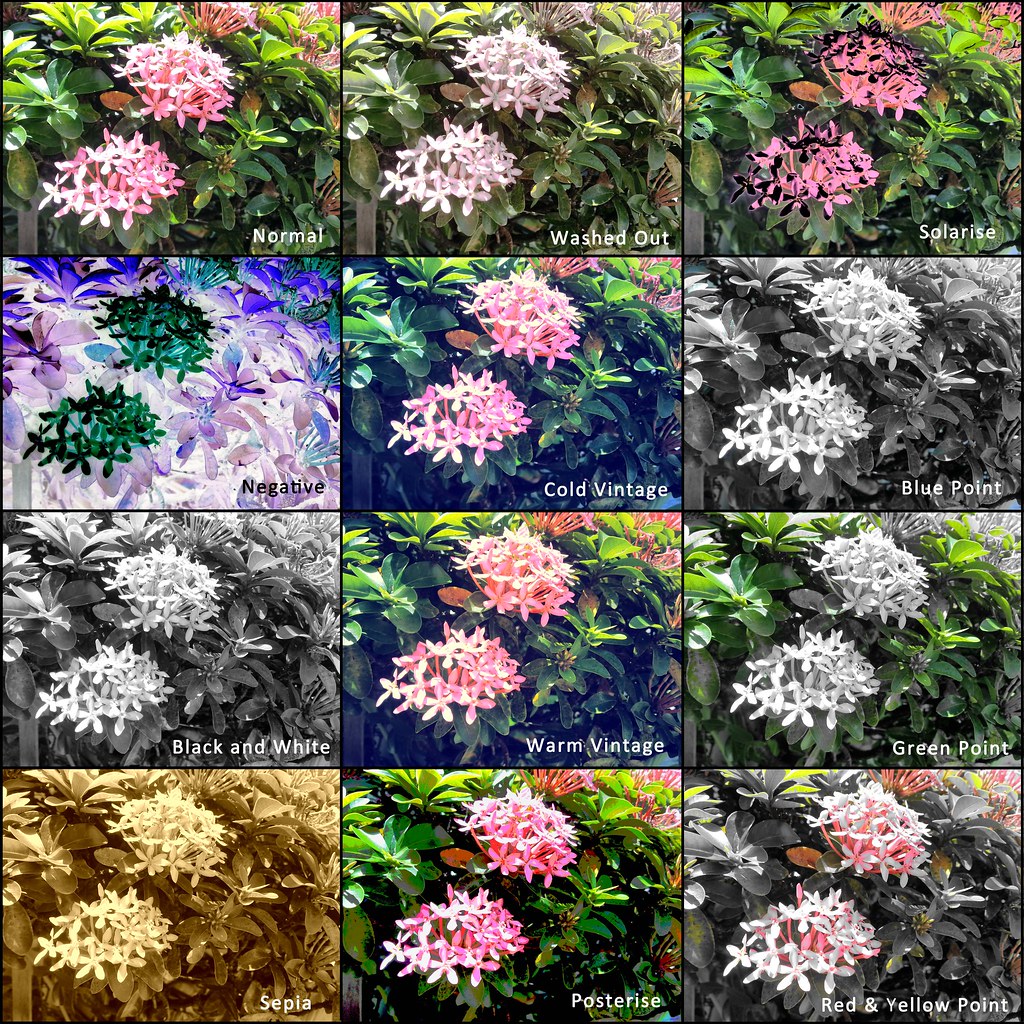
In this post, I will talk about the camera updates only. As some may have realised, the latest firmware brings a significant update which is the introduction of a feature called "Wand". The "Wand" tool offers 11 different types of built in filters that can be applied prior to taking a picture. This saves up time for further post processing via third part applications.

If you are a fan of Instagram, then applying filters will not be a stranger to you. What makes Instagram so famous is its ability to apply various types of filters on photos to make them some how more appealing and interesting. This "Wand" feature is also a respond to HTC One X Image Sense where it also has built in filters that can be applied prior to taking pictures.

Applying filters on photos is a thing that either you love it, or you hate it. Social network active users may welcome this feature to fulfill their needs in uploading pictures across social medias. While photography enthusiast may find it as a gimmicky as it is a tool to beautify bad photographs. 

What filters actually do? Filters to photos are like make ups to woman. Phone cameras cannot achieve superior image quality produced by better cameras, often made their photos turned out to be less interesting, especially with bad lighting and bad cameras. So what filters can do is to reduce the flaws of the photos like bad colour reproduction and noise, apply some heavy toning or heavy editing to make the photos more dynamic and interesting. In order words, it makes bad photos look great.


Having said so, filters also adds mood to the photos itself. A normal picture taken under normal condition may end up in a boring photos. For example like when you taking pictures of urban decays or old objects that you are trying to put in age into the picture, a normal auto settings will just make everything looks, normal. Applying filters like warm vintage, will give you a kind of feel of aging photos or cold vintage will give you a feel of using a polaroid camera. All these filters adds interests into the daily pictures we took, making every photo LOOKS great. That is why filter applying software is very popular among users especially females.

LFB/LG1 Firmware Camera Update

What's New?
  • New "Wand" feature with 11 filter effects
  • Replaced the icon of voice command of a speaking human head to a microphone icon
  • Updated the camera firmware version to GDFF02


Icon changed


What's Gone?
  • The Face Detection focus mode is removed, only available via Shooting Mode

Wand Feature (Effects)

11 filters were included into this current update:
  1. Negative
  2. Black and White
  3. Sepia
  4. Washed Out
  5. Cold Vintage
  6. Warm Vintage
  7. Posterise
  8. Solarise
  9. Blue Point
  10. Green Point
  11. Red-Yellow Point
Most of these filters are pretty self explanatory and I will let the sample pictures to do the talking instead.


However, this effects don't work with the front facing camera. Only the default effects like Negative, B&W and Sepia is working. All the effects are available for video recording thou.

Monday, July 9, 2012

LFB Firmware is Here

I have just flashed to the latest LFB firmware. The wand effects are all there, camera does load up faster, probably due to fresh reboot maybe? Initial browse thru, noticed that the images are less noisy now because I took a sample shot before I flashed the ROM. Probably just me. 

Detail run down coming soon. Stay tuned!

Saturday, July 7, 2012

Galaxy S3 New Firmware Update I9300XXBLFB - Includes Camera Updates

Recently Samsung has released a new firmware that addresses a few issues as well as updating a few features and improved performance. Currently the update is only available for UK models and I guess it will come to other countries soon.

Among these updates, a few key feature updates include brightness slider, camera firmware and software updates, kernels etc.

There a website (Totallydubbed) compiling most of the updates found by users from xda:-

  • Camera voice recognition – icon changed
  • Camera voice recognition – feedback
  • Camera – wand – 11 new modes
  • Swype – now works in google search box
  • Swype – now works in address bar for searching
  • Swype – improved accuracy
  • Text messages – attachment icon on the left
  • Text messages – message box width reduced
  • Text messages – delete specific messages in a conversation
  • New widgets – splanner month, splanner task, splanner mini today, digital clock, all share cast
  • Lock screen – camera launches quicker
  • Audio application checkbox
  • Email – update time
  • Email – message body
  • Redraw issue – fixed
  • Adjusted the screen tone
  • Long press power for silent/vibrate
  • Clock – desk clock
  • S planner – week view changed
  • Camera Firmware has updated from GDFE01 to GDFF02
  • Noticed there is a lot of updates for the camera and the firmware update has rumoured to improve some low light shootings. I will cover about this update as soon as I get to install it. Stay tuned.

    At the mean time, one of the forum member (Andrewtst) from lowyat forum has managed to flashed this new firmware and shared the interface of the new camera software UI.


    Apparently this new "Wand" feature acts like a colour filter that is found in many digital camera as well. Can't wait to get my hands on this new firmware.

    Friday, July 6, 2012

    Blue Blue Sky

    Aperture: 2.6
    ISO: 80
    Shutter Speed: 1/1000
    Shooting Mode: Single
    Scene Mode: None

    Tuesday, July 3, 2012

    Food Photography with S3?

    Food photography by using the Galaxy S3? Yes, it is definitely possible! Taking pictures of your food is probably one of the most use function for a phone, but often we will get undesirable images where the food isn't really appealing due to a few factors such as noise, focus, colours and composition.

    Aperture: 2.6
    ISO: 100
    Shutter Speed: 1/33
    Shooting Mode: Single
    Scene Mode: None 
     
    So, when do you know you have taken a nice picture of your food? It is when people felt hungry and drooling over your pictures!

    In this post, I will share some of my thoughts and experience about taking a mouth watering photo of your food. But firstly, I won't like to clarify that I'm not a professional photographer or a food expert. I'm just sharing some experience I gained when taking pictures of my food by using my camera, as well as phone.

    Aperture: 2.6
    ISO: 125
    Shutter Speed: 1/25
    Shooting Mode: Single
    Scene Mode: None 


    First of all, lighting is very important when shooting food. While natural light is the most desirable source of light, man made lights are sometimes useful as well to create a warm feeling for your pictures. Food are better shot in warmer colour tone than cooler colour tone, having a food picture with a blueish tint doesn't really seem appealing at all, at least for me. So, it is important for you to get a good source of light like sun light or yellow lamp. Fluorescent lights are least desirable when taking pictures of food, just go and try and you will know why. With good lighting and colour temperature, you will have good exposures for your picture and thus reduces noise and increases quality.

    Next will be composition. Most food are best taken in portrait orientation, which is the default orientation when holding a phone, because it is able to represent your food and with a little background. Horizontal orientation also works for some cases like taking pictures of pizza, or a bowl of noddles. Sometimes shooting directly from the top is also a good perspective to show a bird's eye view of your dishes. My recommendation will definitely be portrait orientation for most cases, and then change to horizontal if portrait orientation doesn't work for you.

    Aperture: 2.6
    ISO: 125
    Shutter Speed: 1/20
    Shooting Mode: Single
    Scene Mode: None 

    To compose a good food picture, always fill up two-thirds of your frame with your dishes/food and then manually focus on the most attractive item within the dishes, for example, the chili in the pasta attracts the attention of the eyes first, and hence the focus is on the chili. This is very important when shooting with a camera with wide aperture lens for the narrow D.O.F. but not so important for a phone camera because most likely everything will be in focus. Nevertheless, there is no harm to manually select the focus point to achieve best results. The other one-third of the picture will be reserve for any background objects or the background itself. This is to show the environment and the surroundings to create a better feel and connection to the food.

    Aperture: 2.6
    ISO: 100
    Shutter Speed: 1/33
    Shooting Mode: Single
    Scene Mode: None 

    Due to the wide D.O.F. of the phone camera and wide angle, it is important to frame your food properly to avoid your background to interfere with the interest of the picture. Try shooting from a higher angle to expose more of the area of the table instead of the disturbing background if present.

    Another factor will be the white balance as it governs the colour of your picture. By default, the auto white balance works quite well and I do get a desirable image from it. Occasionally a bit too warm sometimes as shown in the example below. Always check your screen prior to shooting for the best colours, and do not get fooled by your SAMOLED screen!

    Aperture: 2.6
    ISO: 640/800
    Shutter Speed: 1/17
    Shooting Mode: Single
    Scene Mode: None 

    All the tips and recommendations are just for your reference only. It is your freedom and creativity to explore any style of food photography that you like. And to compile your food adventure, I would recommend you to download an app called Evernote Food which is able to compile all the information for your future reference. Or download Million Moments to compile all your pictures in a nice collage album.

    Thursday, June 28, 2012

    Night Panorama Limitations

    I went to Singapore for a 3D2N trip last week and manage to try out a night panorama shot. Apparently there are some limitations when it comes to night panorama shots, mainly due to the slower shutter speed required for the low light conditions, as expected.

    Below is a test shot I took at Clarke Quay and as you can observe in the picture, the middle part is slightly blurred due to the swiping motion during the panorama. The both sides of the picture are sharp and detailed because of the brighter scene.


    It is not impossible to shoot a night panorama with the Galaxy S3. All you need is a very stable hand with a very slow swipe motion. You can predict when the phone is going to take the next picture by following the guide frame in the screen and stop before it. Slowly move your phone until it reaches the frame and tries to stop to let it take a picture before swiping again in the direction.

    Below is a better sample shot taken in the Waterworld of Universal Studio, Singapore. I terminate the panorama after a few frames because I don't want to include the additional crowd into the picture. You can always terminate the panorama by tapping on the shutter button once again.


    Where as in daylight, there is absolutely no problem taking a swipe panorama because the shutter speed is fast enough to avoid any motion blur. Below is a sample shot taken at Marina Bay Sands during day time.


    Wednesday, June 13, 2012

    Colourful Morning Cloud

    Sun ray in the morning colouring the clouds

    Aperture: 2.6
    ISO: 80
    Shutter Speed: 1/50
    Shooting Mode: Single
    Scene Mode: None

    Panorama of Paddy Field

    Wide paddy field panorama

    Aperture: 2.6
    ISO: -
    Shutter Speed: -
    Shooting Mode: Panorama
    Scene Mode: -

    Visiting the Paddy Field with S3

    The paddy is ready to be harvested!

    Aperture: 2.6
    ISO: 80
    Shutter Speed: 1/800
    Shooting Mode: Single
    Scene Mode: None

    A Test Run in Mid Valley

    Hey, it's Mickey Mouse!

    Aperture: 2.6
    ISO: 200
    Shutter Speed: 1/33
    Shooting Mode: Single
    Scene Mode: None